What tags does Cloudmox use?
When a VM is created by Cloudmox, one CMX tag is set in Proxmox..

The cmx tag is for you. This way you can see that a VM is used in Cloudmox
What if you remove a tag?
If Cloudmox has enought confidence that the VM is managed via Cloudmox, Cloudmox will regenerate the tag. So nothing changes.
If Cloudmox does not have enough confidence, then the VM is not shown to the Tenant anymore. As a Superadmin it will be visible to you. You can assign it to a Tenant
The note
There is also a note set. You should not change it.
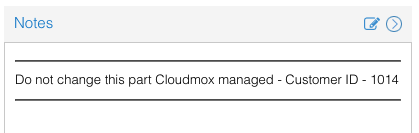
But if you delete it, nothing will break, in terms of, the VM will keep running, but the VM will not be shown to the Tenant anymore. You can assign it to a Tenant again.
Assign to Tenant
When it breaks, that means a Tenant can't see a VM anymore you can easily fix that.
Login as a super admin and find the VM. It will appear as below.
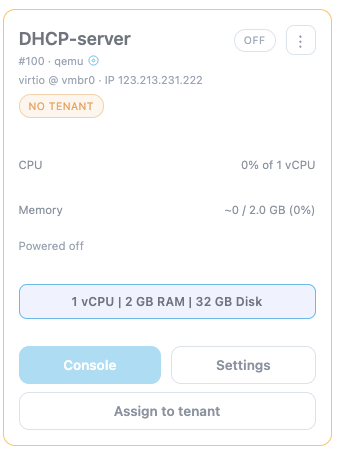
Then you can use the button Assign to tenant to assign the VM to the correct tenant again.